Delayed video replay for sport
Watch your form, a few seconds later
Video Delay films your movement and plays it back on a delay. Put your iPhone on a tripod, make your move, turn round: the action is on screen, and you never touch the phone.
Built first for archery, it works anywhere the movement is over before you can look at it: golf, gymnastics, throwing, lifting, tennis, dance.
Free · no account · no subscription
How it works
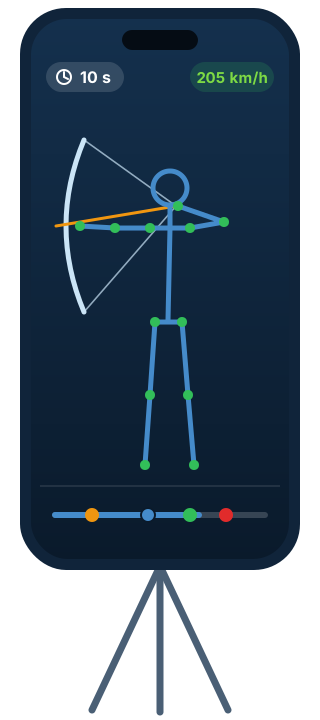
- Stand the iPhone upOn a tripod, a few metres away, so that all of you is in the frame.
- Set the delayFrom 3 to 20 seconds: time to finish your move and turn round.
- Watch the actionYour movement plays on screen, continuously. Save the good bit to Photos with one tap.
A video delay built for training on your own
- A delay you set from 3 to 20 seconds, with no network and no second device
- A grid, and guide lines you draw on the picture to check a shoulder line or an arm alignment
- A skeleton drawn over the athlete
- A button to film what you see on the delay, saved to Photos
- A take mode at up to 240 frames per second for slow motion, depending on your iPhone
- Save to Photos, with or without the guides burned in
For archers: your shots analysed
- Automatic recording: the app watches for your draw and records each arrow to Photos by itself
- Key moments found on every take in take mode: setup, anchor, string release, target impact
- Arrow speed, estimated from the sound of the release and the impact, once your distances are entered
- Your time at anchor, take after take
- Statistics per session: speed, time at anchor, personal best
- Analyse a video from your photo library, up to 60 seconds
Up to four angles on a Mac
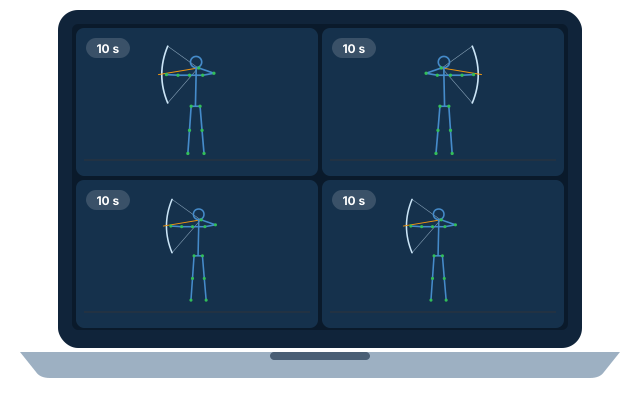
With Video Delay Régie on Mac, up to four iPhones film from different angles and send their picture to one screen, each one delayed. Made for a coach, a club or a shooting line.
Connect with a four-digit code or a QR code, no Wi-Fi needed: the devices find each other directly, and the video never goes over the internet.
Your privacy
No account, no trackers, no third-party ads. Your videos and their sound stay on your phone, unless you agree to send the takes the detector got wrong, to improve it. The app sends anonymous usage statistics, which you can switch off in Settings.
Frequently asked questions
What is a video delay app for?
Seeing your own movement right after you made it, with no helper and no editing: the camera films continuously and the screen replays the picture a few seconds late. You turn round, and your movement plays in front of you.
Is Video Delay free?
Yes. No subscription, no in-app purchase and no account, on iPhone and on Mac.
Which delay should I choose?
From 3 to 20 seconds. For archery, 10 to 15 seconds leaves time to shoot, lower the bow and look at the screen.
How does the app measure arrow speed?
From sound: the microphone hears the arrow leave the bow and hit the target, and the distances you enter give an average speed over the flight, to about ±3 km/h in good conditions.
Do I need a Mac?
No. The iPhone alone is enough for the delay, recording and analysis. The Mac brings up to four angles together on a big screen.
Do I need an internet connection?
No. The delay, recording, analysis and the link to the Mac all work without the internet.
Which devices does it run on?
iPhone with iOS 26, and Mac with macOS 26 for the control room. 240 frames per second depends on the iPhone's camera.
Ready to watch yourself?
Video Delay is made by CapTarget, the training app for archers and coaches, recommended by World Archery.